声明
本文翻译自原文:git — Rebase vs Merge,原作者:Filiz Senyuzluler ,本文仅供学习交流。
正文
git rebase 和 git merge 都是用来合并分支的,但它们的方式有所不同。
举个例子,假设我们已经产生了像下面一样的 commit(译者注:此时有两个分支,master 分支和 feature 分支;ab 当中颜色较深的表示被修改的部分,即*ab 中 a 被修改,ab** 中 b被修改*),git merge 会在 master 分支将两个分支的 commit 合并成一个新快照并提交,而 git rebase 会把 master 分支最后一次 commit 中所有的改动都添加到 feature 分支。
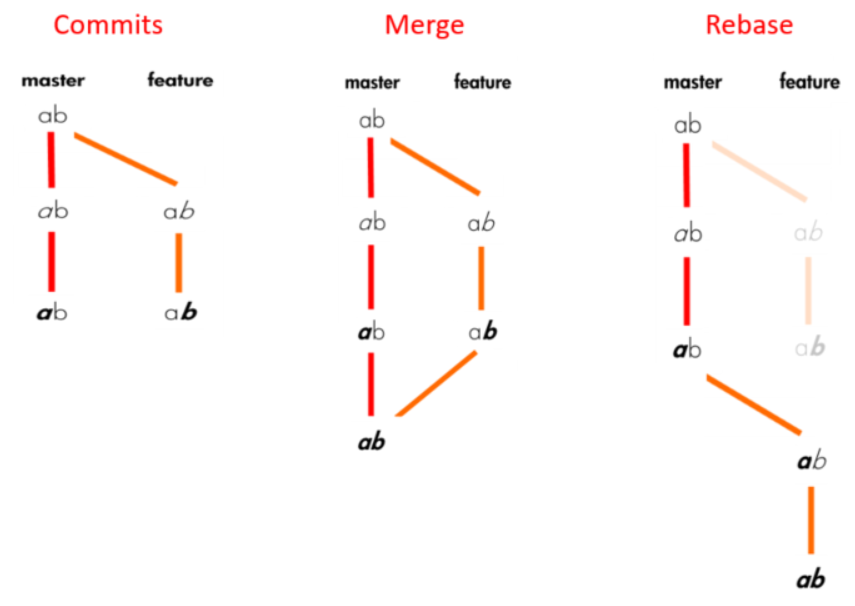
When you do rebase a feature branch onto master, you move the base of the feature branch to master branch’s ending point.
当在
feature分支执行git rebase master时,会将master最新的commit转移到feature分支(译者注:也被称为[*变基*](https://git-scm.com/book/zh/v2/Git-%E5%88%86%E6%94%AF-%E5%8F%98%E5%9F%BA));
Merging takes the contents of the feature branch and integrates it with the master branch. As a result, only the master branch is changed. The feature branch history remains same.
git merge会获取feature分支内容并将其融合进master分支。最后的结果是只有master分支被修改了,feature分支会保持不变;
Merging adds a new commit to your history.
git merge会在历史日志中增加一次commit。
产生的 commit 会像下方一样:
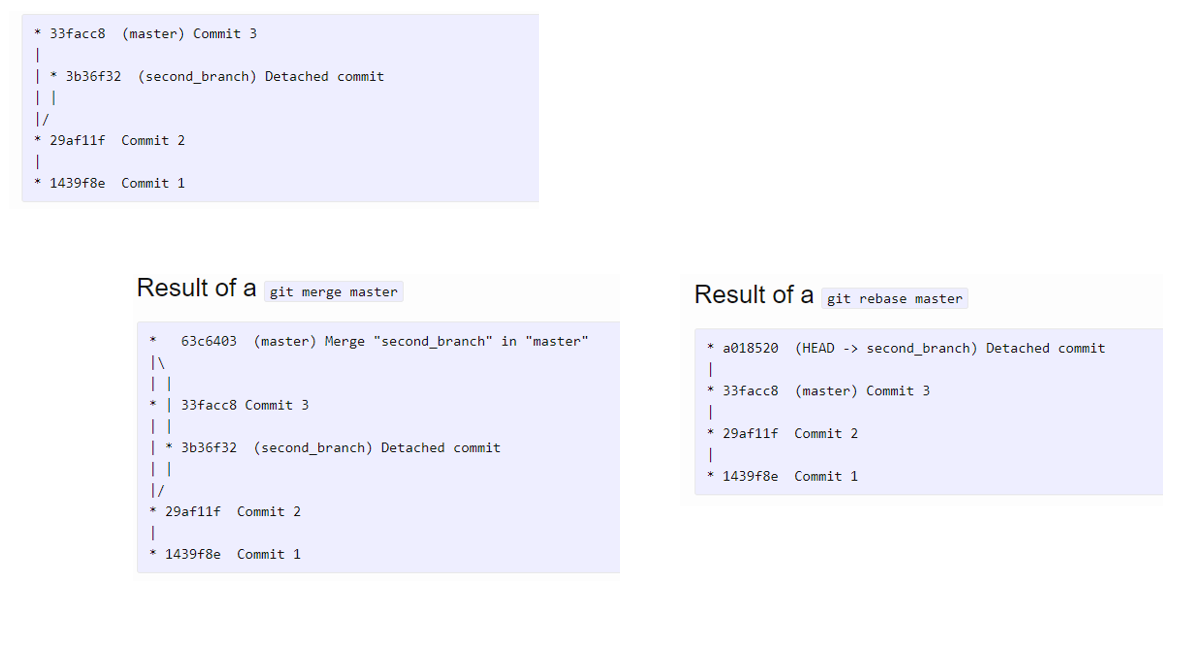
什么时候使用 rebase? 什么时候所以用 merge?
当想要从已与其他开发者共享的 feature 分支获取修改内容时,不推荐使用 rebase,因为 rebase 操作将会创建一个不一致的仓库。对于个人,rebase 要有意义的多;
如果想要看见过程中的完整历史日志(译者注:指git log),应该使用 merge。merge 会保存历史日志,而 rebase 会覆盖历史日志。
rebase 更适合梳理复杂的历史日志,可以用它在交互式命令下修改 commit 记录。还可以删除不想要的 commit,将两个或多个 commit 压缩成一个,还可以编辑 commit message。
rebase 在提交时一次只会显示一个冲突,而 merge 在提交时会显示所有的冲突。尽管 rebase 比 merge 更适合且更容易解决冲突,但要牢记回退一次 rebase 操作也要比回退一次 merge 麻烦的多。更多 git rebase 操作可以参见:git — Basic Rebase。